# Réception de frais - Fonctionnement

Guide explicatif

# Console BSQ

**<u><span style="font-size:16pt;line-height:107%;">Fonctionnement – Réception Frais</span></u>**

**<span style="font-size:10pt;line-height:107%;"> </span>**

**<span style="font-size:10pt;line-height:107%;font-family:'Times New Roman', serif;">Trois situations sont possibles lors de la réception de frais.</span>**

##### <span style="font-size:10pt;line-height:107%;font-family:'Times New Roman', serif;"><span>**1.**<span style="font:7pt 'Times New Roman';">       </span><span style="font:7pt 'Times New Roman';">**Situation 1 -** </span></span></span>**<span style="font-size:10pt;line-height:107%;font-family:'Times New Roman', serif;">Réception d’une bleuetière informatisée avec un document d’expédition contenant un code barre</span>**

##### **<span style="font-size:10pt;line-height:107%;font-family:'Times New Roman', serif;"><span>2.<span style="font:7pt 'Times New Roman';">       **Situation 2** - </span></span></span><span style="font-size:10pt;line-height:107%;font-family:'Times New Roman', serif;">Réception d’une bleuetière informatisée sans document d’expédition mais avec des cartes informatisées contenant un code barre</span>**

**<span style="font-size:10pt;line-height:107%;font-family:'Times New Roman', serif;"><span>3.<span style="font:7pt 'Times New Roman';">       **Situation 3** - </span></span></span><span style="font-size:10pt;line-height:107%;font-family:'Times New Roman', serif;">Réception d’une bleuetière non informatisée.</span>**

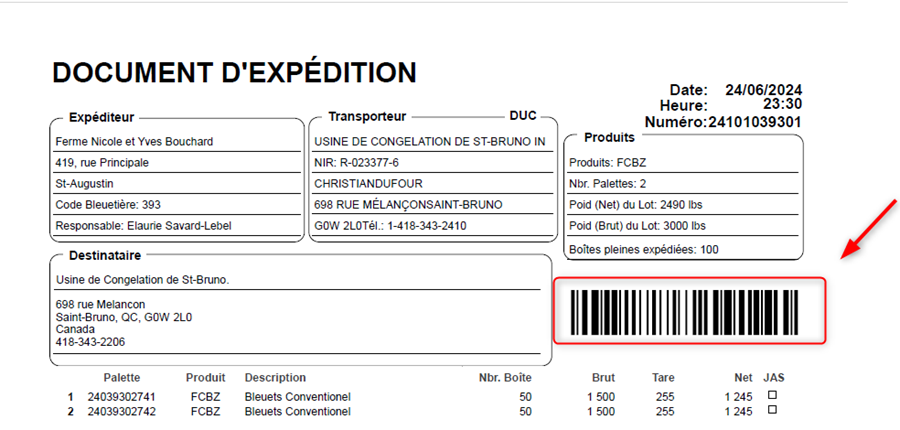
**<u><span style="font-size:10pt;line-height:107%;font-family:'Times New Roman', serif;">Situation 1</span></u><span style="font-size:10pt;line-height:107%;font-family:'Times New Roman', serif;"> – Réception d’une bleuetière informatisée avec un document d’expédition contenant un code barre.</span>**

**<span style="font-size:10pt;line-height:107%;font-family:'Times New Roman', serif;"> </span><span style="font-size:10pt;line-height:107%;font-family:'Times New Roman', serif;">Il suffit de scanner le code barre imprimé sur le document d’expédition de la bleuetière.</span>**

**<span style="font-size:10pt;line-height:107%;font-family:'Times New Roman', serif;"> </span>**

**<span style="font-size:10pt;line-height:107%;font-family:'Times New Roman', serif;">![](https://bdc.wild-blueberries.com/uploads/images/gallery/2024-06/JPGM3n2aCXGG2xkP-embedded-image-wv7jfc60.png)  
</span>**

**<span style="font-size:10pt;line-height:107%;font-family:'Times New Roman', serif;"> </span>**

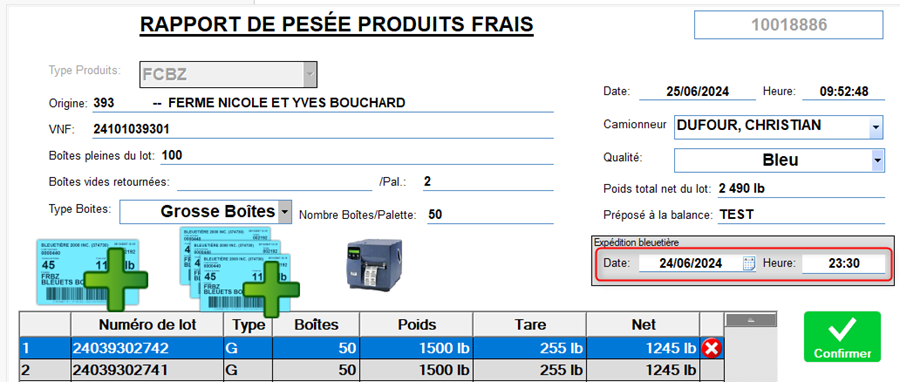
**<span style="font-size:10pt;line-height:107%;font-family:'Times New Roman', serif;">La réception se créera automatiquement avec toutes les informations nécessaires.</span>**

**<span style="font-size:10pt;line-height:107%;font-family:'Times New Roman', serif;"> </span>**

**<span style="font-size:10pt;line-height:107%;font-family:'Times New Roman', serif;">![](https://bdc.wild-blueberries.com/uploads/images/gallery/2024-06/rT74cQpYxCAcGYJR-embedded-image-uwycrh8k.png)  
</span>**

**<span style="font-size:10pt;line-height:107%;font-family:'Times New Roman', serif;"> </span>**

**<span style="font-size:10pt;line-height:107%;font-family:'Times New Roman', serif;">Veuillez noter une nouveauté cette année (encadré rouge) indiquant la date/heure de l’expédition à partir de la bleuetière qui est différente de la date/heure de la réception. Cette information sera utile plus tard pour des fins statistiques.</span>**

**<span style="font-size:10pt;line-height:107%;font-family:'Times New Roman', serif;"> </span>**

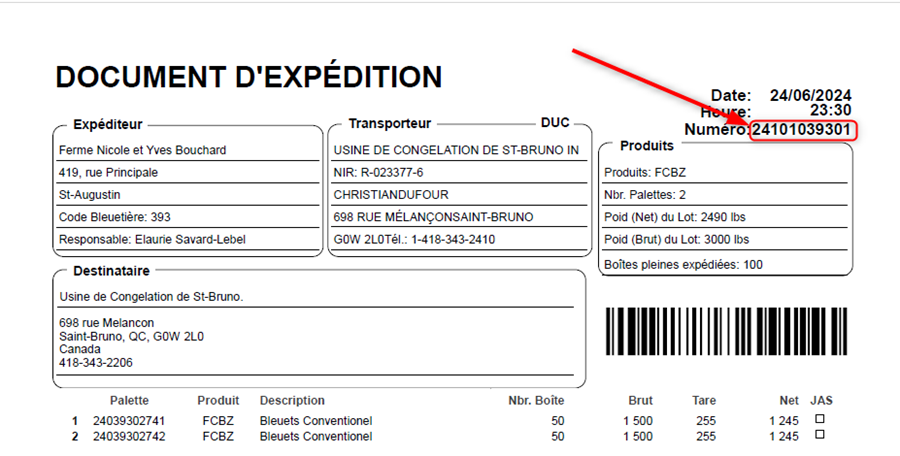
**<span style="font-size:10pt;line-height:107%;font-family:'Times New Roman', serif;">\*\*\* Si le lecteur de code barre est incapable de lire le code barre de l’expédition, vous avez la possibilité de l’inscrire manuellement. Cela aura le même effet que si vous l’aviez scanné.</span>**

**<span style="font-size:10pt;line-height:107%;font-family:'Times New Roman', serif;">  
</span>**

**<span style="font-size:10pt;line-height:107%;font-family:'Times New Roman', serif;"> </span>**

**<span style="font-size:10pt;line-height:107%;font-family:'Times New Roman', serif;"> </span>**

**<span style="font-size:10pt;line-height:107%;font-family:'Times New Roman', serif;">Pour inscrire un code manuellement, cliquer sur l’icone en forme de main en bas de la fenêtre de réception de frais.</span>**

![](https://bdc.wild-blueberries.com/uploads/images/gallery/2024-06/f1WBonkbvHF6n0DQ-embedded-image-fyegx2s6.png)**<span style="font-size:10pt;line-height:107%;font-family:'Times New Roman', serif;"><span> </span></span>**

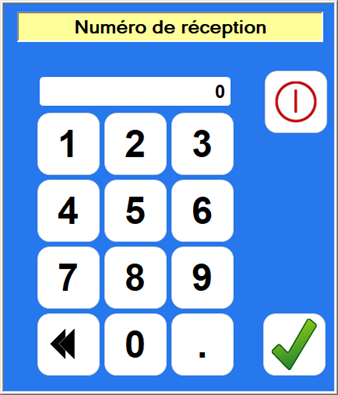
**<span style="font-size:10pt;line-height:107%;font-family:'Times New Roman', serif;">Inscrivez ce numéro dans la fenêtre proposée.</span>**

![](https://bdc.wild-blueberries.com/uploads/images/gallery/2024-06/EanT0XeOv8O1SNrT-embedded-image-clpdq86r.png)**<span style="font-size:10pt;line-height:107%;font-family:'Times New Roman', serif;"><span> </span></span>**

**<span style="font-size:10pt;line-height:107%;font-family:'Times New Roman', serif;">![](https://bdc.wild-blueberries.com/uploads/images/gallery/2024-06/qK7Z0QuBMbKLFqez-embedded-image-jpvdwzjh.png)  
</span>**

**<span style="font-size:10pt;line-height:107%;font-family:'Times New Roman', serif;">  
</span>**

**<span style="font-size:10pt;line-height:107%;font-family:'Times New Roman', serif;"> </span>**

**<u><span style="font-size:10pt;line-height:107%;font-family:'Times New Roman', serif;">Situation 2</span></u><span style="font-size:10pt;line-height:107%;font-family:'Times New Roman', serif;"> - Réception d’une bleuetière informatisée sans document d’expédition mais avec des cartes informatisées contenant un code barre</span>**

**<span style="font-size:10pt;line-height:107%;font-family:'Times New Roman', serif;"> </span>**

**<span style="font-size:10pt;line-height:107%;font-family:'Times New Roman', serif;">Il faut créer manuellement la réception avant de pouvoir scanner des cartes dans la réception.</span>**

**<span style="font-size:10pt;line-height:107%;font-family:'Times New Roman', serif;">Utilisez le bouton en bas de la fenêtre de réception de frais.</span>**

**<span style="font-size:10pt;line-height:107%;font-family:'Times New Roman', serif;">![](https://bdc.wild-blueberries.com/uploads/images/gallery/2024-06/npwJxs6HyWabk8sr-embedded-image-gw0gspgd.png)  
</span>**

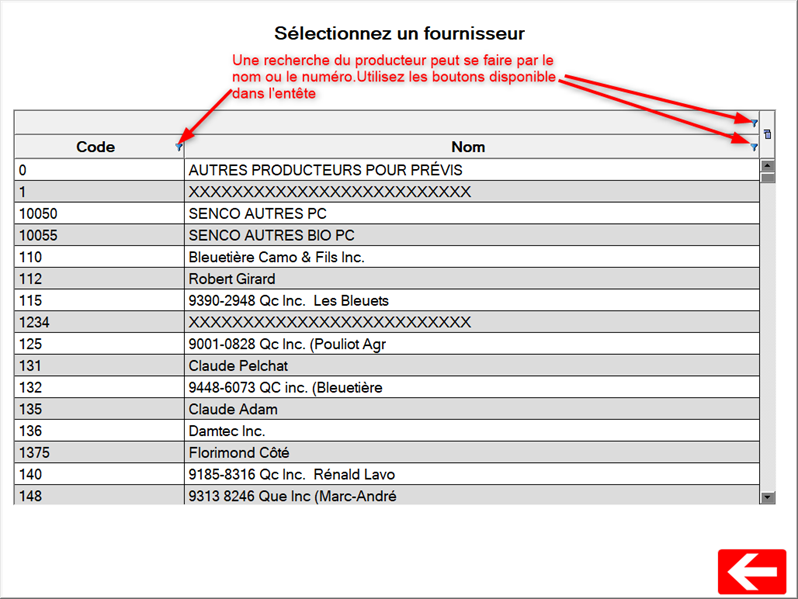
**<span style="font-size:10pt;line-height:107%;font-family:'Times New Roman', serif;">Choisissez le producteur dans la fenêtre suivante.</span>**

**<span style="font-size:10pt;line-height:107%;font-family:'Times New Roman', serif;">![](https://bdc.wild-blueberries.com/uploads/images/gallery/2024-06/CM7ppHT669MsqgBW-embedded-image-luesj8sh.png)  
</span>**

**<span style="font-size:10pt;line-height:107%;font-family:'Times New Roman', serif;"> </span>**

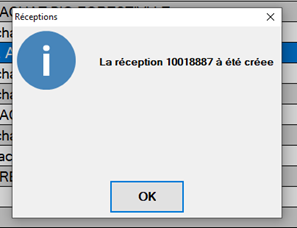
**<span style="font-size:10pt;line-height:107%;font-family:'Times New Roman', serif;">Double-cliquez sur le producteur à utiliser. Un message vous indiquera que la réception est créée. </span>**

**<span style="font-size:10pt;line-height:107%;font-family:'Times New Roman', serif;"> </span>**

**<span style="font-size:10pt;line-height:107%;font-family:'Times New Roman', serif;">![](https://bdc.wild-blueberries.com/uploads/images/gallery/2024-06/jjiw2JKZQGR1AVl5-embedded-image-yiqdim2o.png)  
</span>**

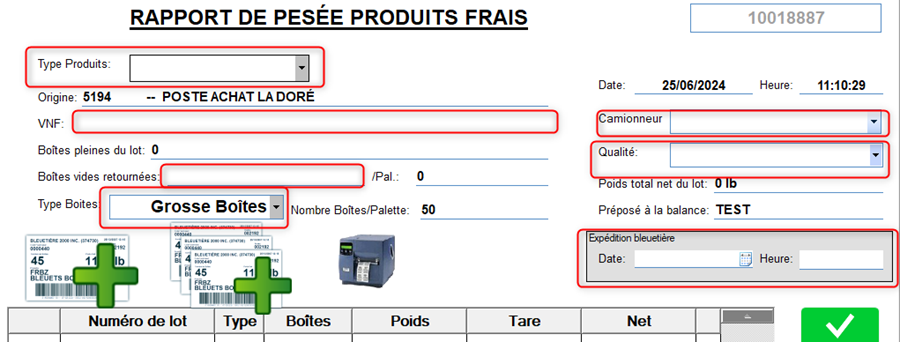
**<span style="font-size:10pt;line-height:107%;font-family:'Times New Roman', serif;">Cliquez sur le bouton OK. La réception s’ouvrira. Inscrivez les informations obligatoires.</span>**

**<span style="font-size:10pt;line-height:107%;font-family:'Times New Roman', serif;">![](https://bdc.wild-blueberries.com/uploads/images/gallery/2024-06/nZ3tKGSNvgqUkMsG-embedded-image-hma1p35n.png)  
</span>**

**<span style="font-size:10pt;line-height:107%;font-family:'Times New Roman', serif;"> </span>**

**<span style="font-size:10pt;line-height:107%;font-family:'Times New Roman', serif;">Une fois cette étape terminée, vous pouvez scanner les cartes à inclure dans cette réception.</span>**

**<span style="font-size:10pt;line-height:107%;font-family:'Times New Roman', serif;">  
</span>**

**<span style="font-size:10pt;line-height:107%;font-family:'Times New Roman', serif;"> </span>**

**<u><span style="font-size:10pt;line-height:107%;font-family:'Times New Roman', serif;">Situation 3</span></u><span style="font-size:10pt;line-height:107%;font-family:'Times New Roman', serif;"> - Réception d’une bleuetière non informatisée.</span>**

**<span style="font-size:10pt;line-height:107%;font-family:'Times New Roman', serif;"> </span>**

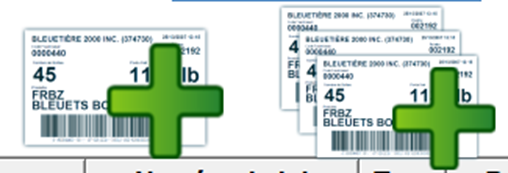
**<span style="font-size:10pt;line-height:107%;font-family:'Times New Roman', serif;">Il faut créer la réception (mêmes étapes que la situation 2).<span>  </span>Cependant une fois la réception créée il faut entrer les cartes manuellement en utilisant ces boutons.</span>**

**<span style="font-size:10pt;line-height:107%;font-family:'Times New Roman', serif;"> </span>**

**<span style="font-size:10pt;line-height:107%;font-family:'Times New Roman', serif;">![](https://bdc.wild-blueberries.com/uploads/images/gallery/2024-06/t2n3XQvlFOlElDCt-embedded-image-bcfzlg63.png)  
</span>**

**<span style="font-size:10pt;line-height:107%;font-family:'Times New Roman', serif;"> </span>**

**<span style="font-size:10pt;line-height:107%;font-family:'Times New Roman', serif;">Le bouton de gauche permet de créer une carte. Le bouton de droite permet de créer un lot de carte. La couleur des boutons peut être différente selon le produit choisi dans &lt;Type Produits&gt;.</span>**

**<span style="font-size:10pt;line-height:107%;font-family:'Times New Roman', serif;"> </span>**

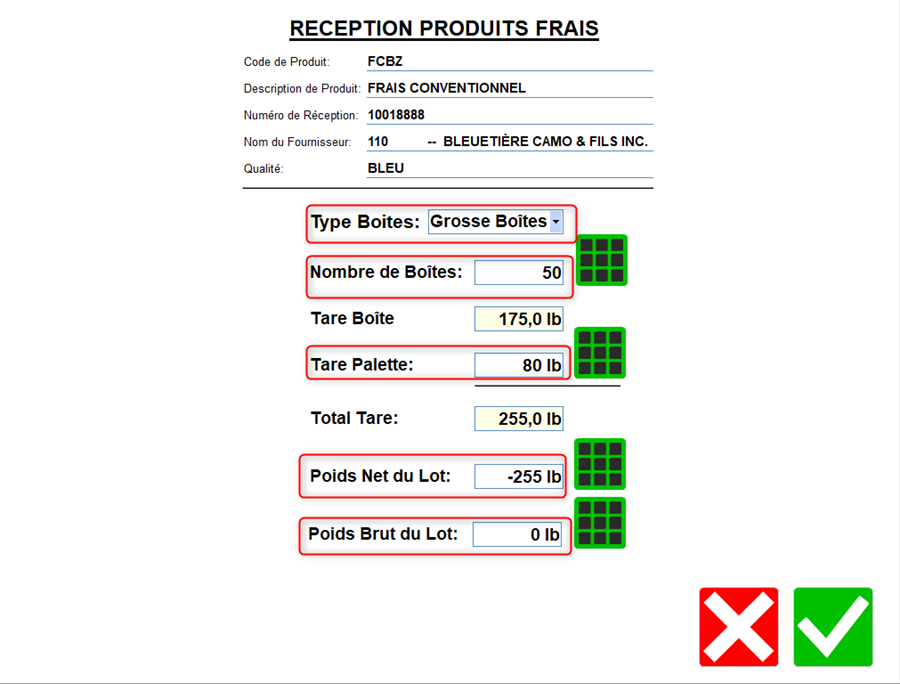
**<span style="font-size:10pt;line-height:107%;font-family:'Times New Roman', serif;">Création d’une seule carte. En cliquent sur le bouton, la fenêtre suivante s’ouvrira.</span>**

**<span style="font-size:10pt;line-height:107%;font-family:'Times New Roman', serif;">![](https://bdc.wild-blueberries.com/uploads/images/gallery/2024-06/8jGfPoSzFUXnTIe8-embedded-image-5ywtvnj0.png)  
</span>**

**<span style="font-size:10pt;line-height:107%;font-family:'Times New Roman', serif;"> </span>**

**<span style="font-size:10pt;line-height:107%;font-family:'Times New Roman', serif;">Modifier le nombre de boîte au besoin.</span>**

**<span style="font-size:10pt;line-height:107%;font-family:'Times New Roman', serif;">Modifier le Tare Palette au besoin.</span>**

**<span style="font-size:10pt;line-height:107%;font-family:'Times New Roman', serif;">Inscrivez le poids net du lot si vous le connaissez. Le calcul du poids brut du lot sera fait selon les informations inscrites plus haut (Tare boite, nombre de boite, Tare Palette).</span>**

**<span style="font-size:10pt;line-height:107%;font-family:'Times New Roman', serif;">Sinon inscrivez le poids Brut du lot. Le calcul du poids net du lot sera fait selon les informations inscrites plus haut (Tare boite, nombre de boite, Tare Palette).</span>**

**<span style="font-size:10pt;line-height:107%;font-family:'Times New Roman', serif;"> </span>**

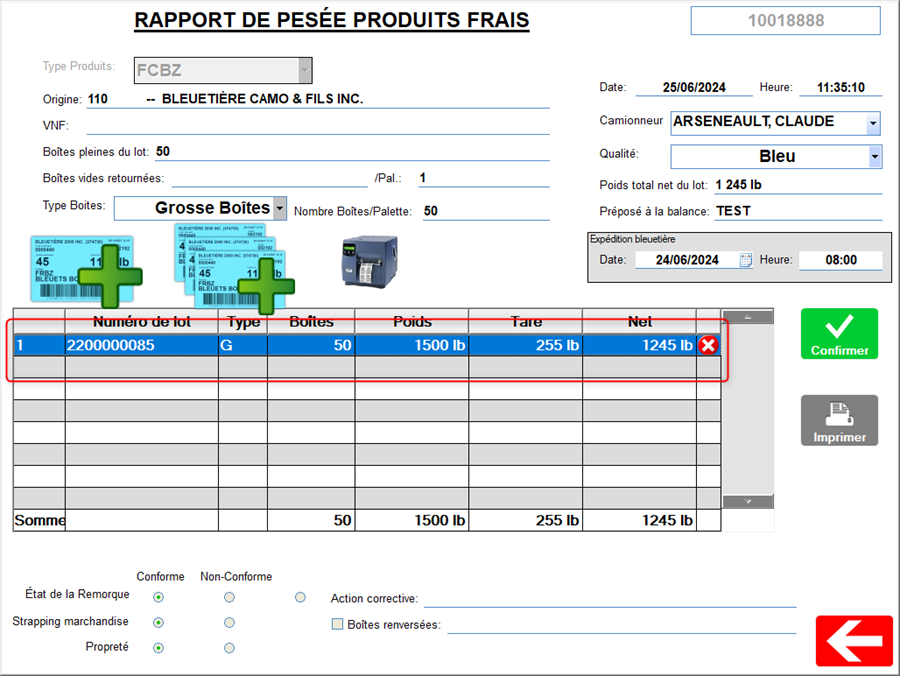
**<span style="font-size:10pt;line-height:107%;font-family:'Times New Roman', serif;">Pour créer la carte, cliquez sur le crochet vert. Une carte sera créée/imprimée et viendra s’insérer dans le tableau au milieu de la fenêtre.</span>**

**<span style="font-size:10pt;line-height:107%;font-family:'Times New Roman', serif;">![](https://bdc.wild-blueberries.com/uploads/images/gallery/2024-06/FysbUfAU5zeDt9i7-embedded-image-6sqjrfgq.png)  
</span>**

**<span style="font-size:10pt;line-height:107%;font-family:'Times New Roman', serif;"> </span>**

**<span style="font-size:10pt;line-height:107%;font-family:'Times New Roman', serif;"> </span>**

**<span style="font-size:10pt;line-height:107%;font-family:'Times New Roman', serif;">  
</span>**

**<span style="font-size:10pt;line-height:107%;font-family:'Times New Roman', serif;"> </span>**

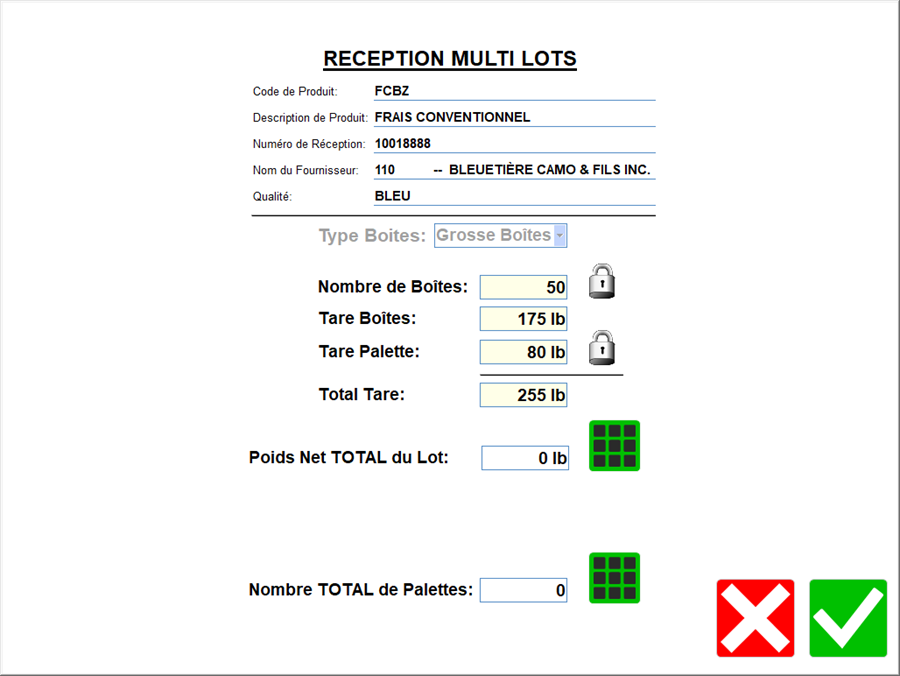
**<span style="font-size:10pt;line-height:107%;font-family:'Times New Roman', serif;">Création de cartes en lot. En cliquant sur le bouton de droite, la fenêtre suivante s’ouvrira.</span>**

**<span style="font-size:10pt;line-height:107%;font-family:'Times New Roman', serif;"> </span>**

**<span style="font-size:10pt;line-height:107%;font-family:'Times New Roman', serif;">![](https://bdc.wild-blueberries.com/uploads/images/gallery/2024-06/PGTk4m8tdC70jCY1-embedded-image-rosnwoat.png)  
</span>**

**<span style="font-size:10pt;line-height:107%;font-family:'Times New Roman', serif;"> </span>**

**<span style="font-size:10pt;line-height:107%;font-family:'Times New Roman', serif;">Inscrivez le poids net total du lot.</span>**

**<span style="font-size:10pt;line-height:107%;font-family:'Times New Roman', serif;">Inscrivez le nombre de cartes à créer.</span>**

**<span style="font-size:10pt;line-height:107%;font-family:'Times New Roman', serif;"> </span>**

**<span style="font-size:10pt;line-height:107%;font-family:'Times New Roman', serif;">En appuyant sur le crochet vert, le nombre de cartes demandées s’imprimera et viendront s’insérer dans le tableau au milieu de la fenêtre.</span>**

**<span style="font-size:10pt;line-height:107%;font-family:'Times New Roman', serif;"> </span>**

**<span style="font-size:10pt;line-height:107%;font-family:'Times New Roman', serif;">  
</span>**

**<span style="font-size:10pt;line-height:107%;font-family:'Times New Roman', serif;"> </span>**

**<u><span style="font-size:14pt;line-height:107%;font-family:'Times New Roman', serif;">Confirmation d’une réception.</span></u>**

**<u><span style="font-size:14pt;line-height:107%;font-family:'Times New Roman', serif;"><span style="text-decoration:none;"> </span></span></u>**

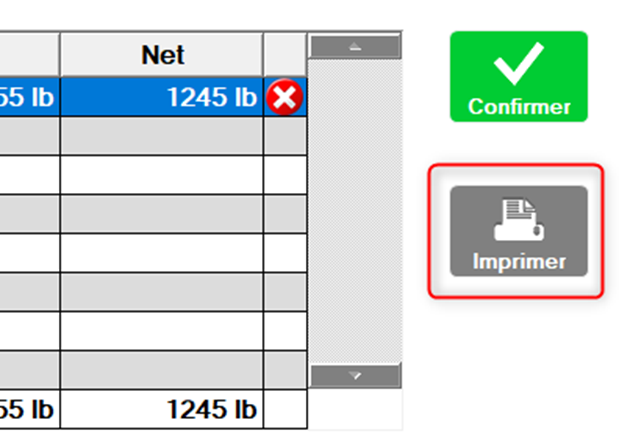
**<span style="font-size:10pt;line-height:107%;font-family:'Times New Roman', serif;">Avant de confirmer une réception, vous avez la possibilité de l’imprimer afin de vérifier les données.</span>**

**<span style="font-size:10pt;line-height:107%;font-family:'Times New Roman', serif;">Utilisez le bouton imprimer à droite. </span>**

**<span style="font-size:10pt;line-height:107%;font-family:'Times New Roman', serif;"> </span>**

**<span style="font-size:10pt;line-height:107%;font-family:'Times New Roman', serif;">![](https://bdc.wild-blueberries.com/uploads/images/gallery/2024-06/HXFTtlrNgArxkcGr-embedded-image-upkpcll6.png)  
</span>**

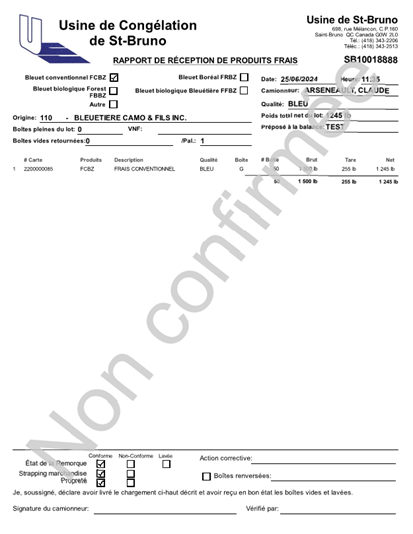
**<span style="font-size:10pt;line-height:107%;font-family:'Times New Roman', serif;">Un rapport de réception s’imprimera avec en filigrane la mention<span>  </span>&lt;Non confirmée&gt;</span>**

**<span style="font-size:10pt;line-height:107%;font-family:'Times New Roman', serif;">![](https://bdc.wild-blueberries.com/uploads/images/gallery/2024-06/YeY3taPj41YheTKg-embedded-image-eukwoytq.png)  
</span>**

**<span style="font-size:10pt;line-height:107%;font-family:'Times New Roman', serif;"> </span>**

**<span style="font-size:10pt;line-height:107%;font-family:'Times New Roman', serif;"> </span>**

**<span style="font-size:10pt;line-height:107%;font-family:'Times New Roman', serif;">Lorsque la réception est terminée, il faut la confirmer afin que les informations s’enregistrent dans les différentes bases de données.</span>**

**<span style="font-size:10pt;line-height:107%;font-family:'Times New Roman', serif;">Utilisez le bouton confirmer à droite.</span>**

**<span style="font-size:10pt;line-height:107%;font-family:'Times New Roman', serif;">![](https://bdc.wild-blueberries.com/uploads/images/gallery/2024-06/tZYYBiEFa4yptelt-embedded-image-paypyuge.png)  
</span>**

**<span style="font-size:10pt;line-height:107%;font-family:'Times New Roman', serif;"> </span>**

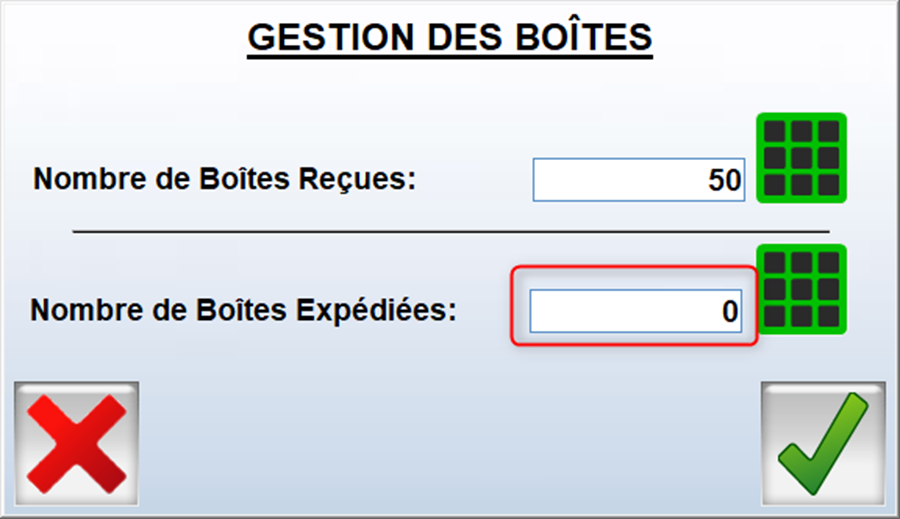
**<span style="font-size:10pt;line-height:107%;font-family:'Times New Roman', serif;">Avant de terminer la confirmation, une question vous sera posée.</span>**

**<span style="font-size:10pt;line-height:107%;font-family:'Times New Roman', serif;">Indiquez le nombre de boites renvoyés à la bleuetière.</span>**

**<span style="font-size:10pt;line-height:107%;font-family:'Times New Roman', serif;">![](https://bdc.wild-blueberries.com/uploads/images/gallery/2024-06/S8Sd7gfVGV33Lwe8-embedded-image-4p9ghiha.png)  
</span>**

**<span style="font-size:10pt;line-height:107%;font-family:'Times New Roman', serif;">Le document de réception s’imprimera ensuite.</span>**

**<u><span style="font-size:14pt;line-height:107%;font-family:'Times New Roman', serif;">Autres caractéristiques de la réception de frais</span></u>**

**<span style="font-size:10pt;line-height:107%;font-family:'Times New Roman', serif;"> </span>**

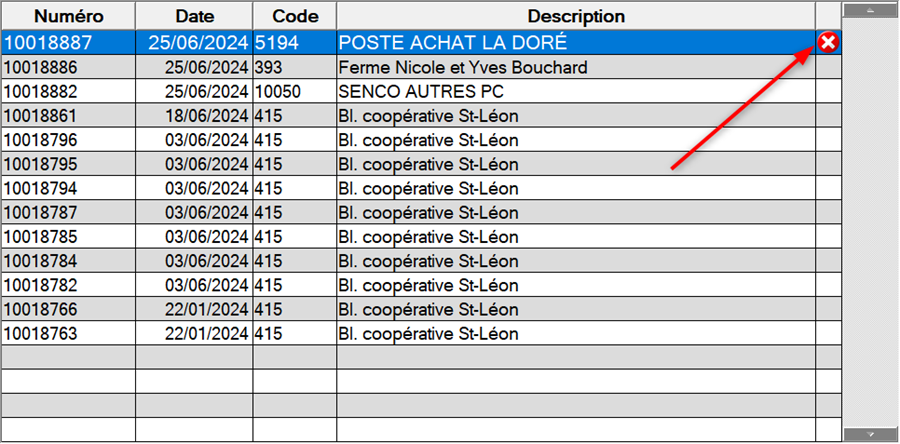
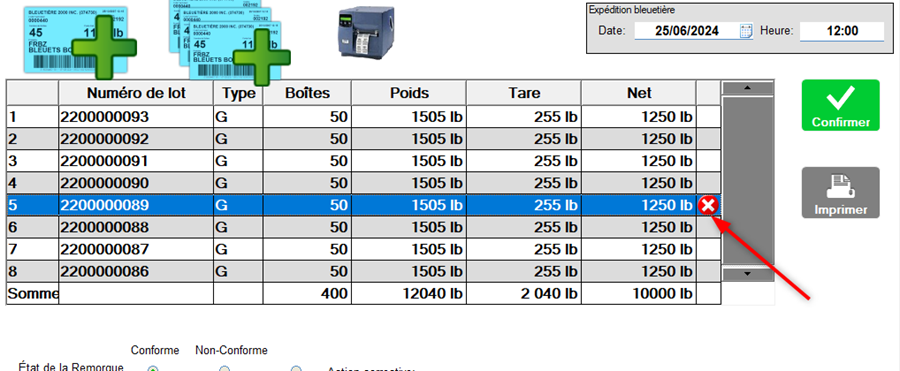
**<u><span style="font-size:10pt;line-height:107%;font-family:'Times New Roman', serif;">Il est possible de supprimer une réception non confirmée</span></u><span style="font-size:10pt;line-height:107%;font-family:'Times New Roman', serif;">.</span>**

**<span style="font-size:10pt;line-height:107%;font-family:'Times New Roman', serif;">Dans la fenêtre principale des réceptions de produit frais, sélectionner la ligne de la réception à supprimer et cliquez sur le X rouge à droite.</span>**

**<span style="font-size:10pt;line-height:107%;font-family:'Times New Roman', serif;">![](https://bdc.wild-blueberries.com/uploads/images/gallery/2024-06/aBjHsNawIPb9MMyf-embedded-image-ymvfskq5.png)  
</span>**

**<span style="font-size:10pt;line-height:107%;font-family:'Times New Roman', serif;">On vous demandera de confirmer la suppression.</span>**

**<u><span style="font-size:10pt;line-height:107%;font-family:'Times New Roman', serif;">Il est aussi possible de supprimer une carte sur une réception</span></u><span style="font-size:10pt;line-height:107%;font-family:'Times New Roman', serif;">. </span>**

**<span style="font-size:10pt;line-height:107%;font-family:'Times New Roman', serif;">Ouvrez la réception si ce n’est pas déjà fait. Dans le tableau des cartes au milieu, sélectionnez la carte à supprimer et cliquez sur le x rouge à droite.</span>**

**<span style="font-size:10pt;line-height:107%;font-family:'Times New Roman', serif;"> </span>**

**<span style="font-size:10pt;line-height:107%;font-family:'Times New Roman', serif;">![](https://bdc.wild-blueberries.com/uploads/images/gallery/2024-06/9Ih0AYxzEk70mo6a-embedded-image-pvls06al.png)  
</span>**

**<span style="font-size:10pt;line-height:107%;font-family:'Times New Roman', serif;"> </span>**

**<span style="font-size:10pt;line-height:107%;font-family:'Times New Roman', serif;">On vous demandera de confirmer la suppression.</span>**

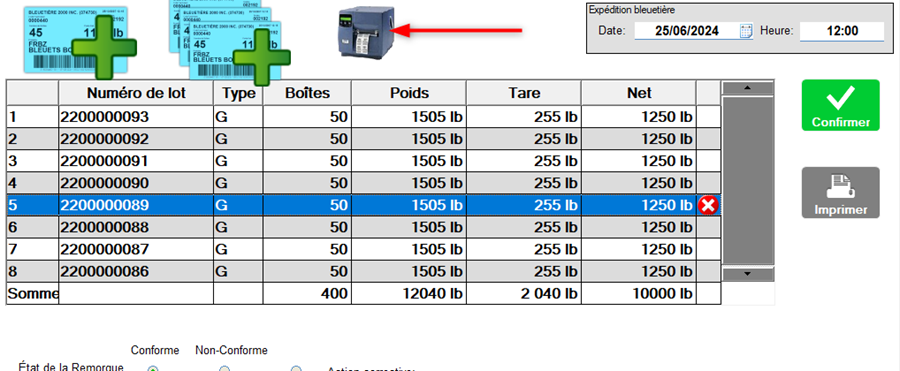
**<u><span style="font-size:10pt;line-height:107%;font-family:'Times New Roman', serif;">Il est possible de réimprimer une carte au besoin à partir de la réception</span></u><span style="font-size:10pt;line-height:107%;font-family:'Times New Roman', serif;">.</span>**

**<span style="font-size:10pt;line-height:107%;font-family:'Times New Roman', serif;">Ouvrez la réception si ce n’est pas déjà fait. Dans le tableau des cartes au milieu, sélectionnez la carte à supprimer et cliquez sur l’icône imprimante.</span>**

**<span style="font-size:10pt;line-height:107%;font-family:'Times New Roman', serif;">![](https://bdc.wild-blueberries.com/uploads/images/gallery/2024-06/QIortWM5DTZmBKfw-embedded-image-efxke5yn.png)  
</span>**

**<span style="font-size:10pt;line-height:107%;font-family:'Times New Roman', serif;"> </span><span style="font-size:10pt;line-height:107%;font-family:'Times New Roman', serif;"> </span>**

**<u><span style="font-size:10pt;line-height:107%;font-family:'Times New Roman', serif;">Il est possible de réimprimer une réception confirmée</span></u><span style="font-size:10pt;line-height:107%;font-family:'Times New Roman', serif;">.</span>**

**<span style="font-size:10pt;line-height:107%;font-family:'Times New Roman', serif;">![](https://bdc.wild-blueberries.com/uploads/images/gallery/2024-06/BLzhdqUJYf0yGCVW-embedded-image-iq1bwezs.png)  
</span>**

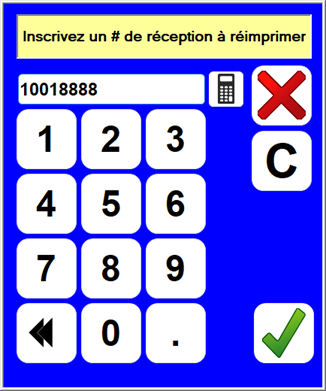
**<span style="font-size:10pt;line-height:107%;font-family:'Times New Roman', serif;">Inscrivez le numéro de réception à réimprimer. Ce numéro apparait sur le document imprimé lors de la confirmation et a la forme SB9999999 ou les 2 premiers caractères désigne l’usine et les 8 derniers le numéro de réception. </span><span style="font-family:'Times New Roman', serif;color:#FF0000;">Inscrivez seulement les 8 derniers chiffres</span><span style="font-size:10pt;line-height:107%;font-family:'Times New Roman', serif;">.</span>**

**<span style="font-size:10pt;line-height:107%;font-family:'Times New Roman', serif;">Exemple j’ai la réception SB10018888, j’inscrit seulement 10018888 dans la fenêtre suivante.</span>**

**<span style="font-size:10pt;line-height:107%;font-family:'Times New Roman', serif;">![](https://bdc.wild-blueberries.com/uploads/images/gallery/2024-06/0WiBNmYr0yukZrcj-embedded-image-p0o9ati8.png)  
</span>**

**<span style="font-size:10pt;line-height:107%;font-family:'Times New Roman', serif;">La réception se réimprimera.</span>**

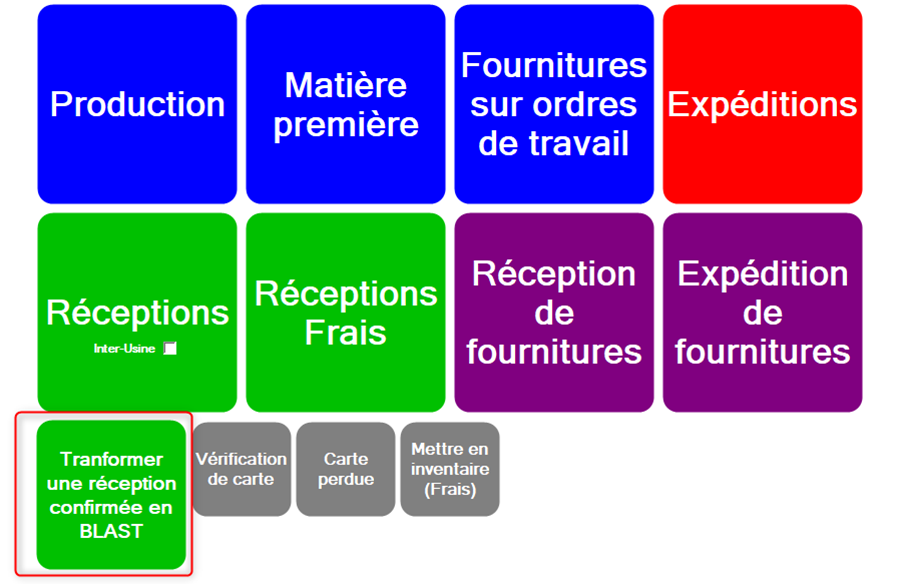
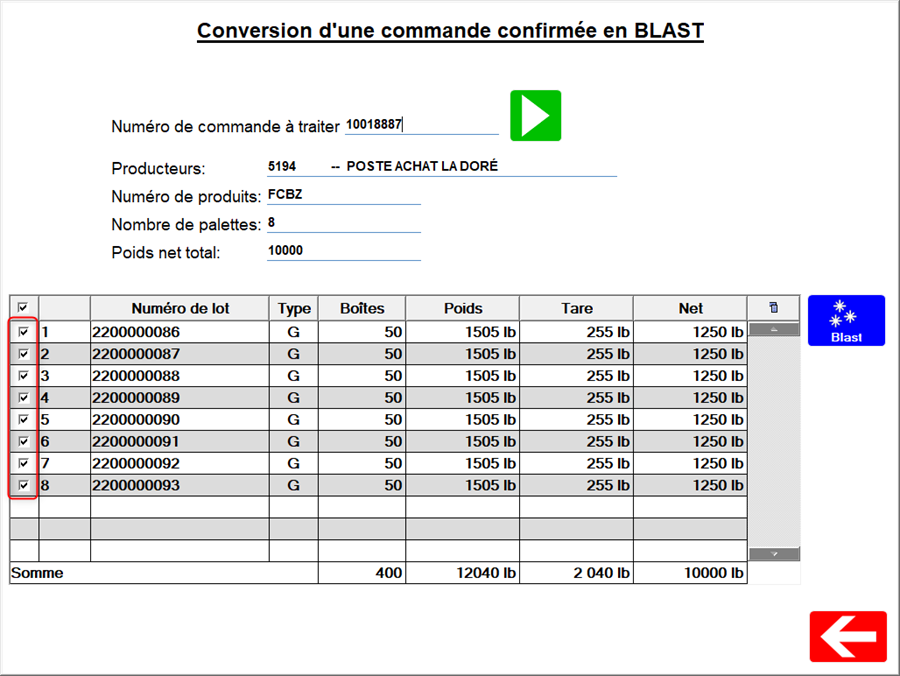
**<span style="font-size:10pt;line-height:107%;font-family:'Times New Roman', serif;">Il est possible de créer des produits BLAST à partir d’une réception confirmée.</span>**

**<span style="font-size:10pt;line-height:107%;font-family:'Times New Roman', serif;">A partir de la page principale de ConsoleBSQ, cliquez sur le bouton &lt;Transformer une réception confirmée en BLAST&gt;.</span>**

**<span style="font-size:10pt;line-height:107%;font-family:'Times New Roman', serif;">![](https://bdc.wild-blueberries.com/uploads/images/gallery/2024-06/hDvxOV2JJkf3lkOK-embedded-image-xnemkaz7.png)  
</span>**

**<span style="font-size:10pt;line-height:107%;font-family:'Times New Roman', serif;">  
  
</span>**

**<span style="font-size:10pt;line-height:107%;font-family:'Times New Roman', serif;">  
</span>**

**<span style="font-size:10pt;line-height:107%;font-family:'Times New Roman', serif;"> </span>**

**<span style="font-size:10pt;line-height:107%;font-family:'Times New Roman', serif;"> </span>**

**<span style="font-size:10pt;line-height:107%;font-family:'Times New Roman', serif;">La fenêtre suivante s’ouvrira.</span>**

**<span style="font-size:10pt;line-height:107%;font-family:'Times New Roman', serif;">![](https://bdc.wild-blueberries.com/uploads/images/gallery/2024-06/ZADX5eyMpjIvaeWa-embedded-image-ynu1wgju.png)  
</span>**

**<span style="font-size:10pt;line-height:107%;font-family:'Times New Roman', serif;"> </span>**

**<span style="font-size:10pt;line-height:107%;font-family:'Times New Roman', serif;">Inscrivez le numéro de réception à transformer dans &lt;numéro de commande à traiter&gt; (</span><span style="font-family:'Times New Roman', serif;color:#FF0000;">Inscrivez seulement les 8 derniers chiffres</span><span style="font-size:10pt;line-height:107%;font-family:'Times New Roman', serif;">) et cliquez sur la flèche verte.</span>**

**<span style="font-size:10pt;line-height:107%;font-family:'Times New Roman', serif;"> </span>**

**<span style="font-size:10pt;line-height:107%;font-family:'Times New Roman', serif;">Le détail de la réception apparaîtra.</span>**

**<span style="font-size:10pt;line-height:107%;font-family:'Times New Roman', serif;">![](https://bdc.wild-blueberries.com/uploads/images/gallery/2024-06/25yJ7SnuNgc5mr6X-embedded-image-ottnkjqz.png)  
</span>**

**<span style="font-size:10pt;line-height:107%;font-family:'Times New Roman', serif;"> </span>**

**<span style="font-size:10pt;line-height:107%;font-family:'Times New Roman', serif;">Utilisez les cases à cocher à gauche pour exclure des cartes de l’opération.</span>**

**<span style="font-size:10pt;line-height:107%;font-family:'Times New Roman', serif;">Cliquez sur le bouton &lt;Blast&gt; </span>**

**<span style="font-size:10pt;line-height:107%;font-family:'Times New Roman', serif;">La fenêtre suivante s’ouvrira listant les ordres de travail ouvert. Il faut au préalable avoir créé un ordre de travail dans lequel la transformation en BLAST sera effectuée (Dans Casque Blanc).</span>**

**<span style="font-size:10pt;line-height:107%;font-family:'Times New Roman', serif;">Sélection l’ordre de travail dans la liste du haut et le produit fini dans le tableau du bas.</span>**

**<span style="font-size:10pt;line-height:107%;font-family:'Times New Roman', serif;">Cliquez sur confirmer.</span>**

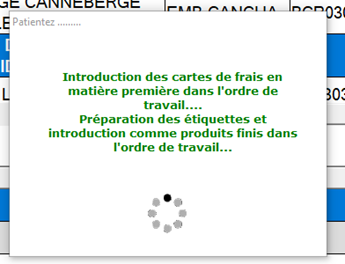
**<span style="font-size:10pt;line-height:107%;font-family:'Times New Roman', serif;">Un message d’attente apparaîtra confirmant que le travail est en cours.</span>**

**<span style="font-size:10pt;line-height:107%;font-family:'Times New Roman', serif;">Ensuite les nouvelles étiquettes seront imprimées</span>**

**<span style="font-size:10pt;line-height:107%;font-family:'Times New Roman', serif;">![](https://bdc.wild-blueberries.com/uploads/images/gallery/2024-06/GtjQf9znEn5qLOZ5-embedded-image-gpz3cbnp.png)  
</span>**

**<u><span style="font-size:10pt;line-height:107%;font-family:'Times New Roman', serif;">Messages d’erreur et/ou d’information</span></u>**

**<span style="font-size:10pt;line-height:107%;font-family:'Times New Roman', serif;">Certains messages peuvent apparaître sporadiquement.</span>**

**<span style="font-size:10pt;line-height:107%;font-family:'Times New Roman', serif;">Ce ne sont pas nécessairement des messages d’erreur.</span>**

**<span style="font-size:10pt;line-height:107%;font-family:'Times New Roman', serif;">Il se peut que ces messages vous indiquent que toutes les informations ne sont pas inscrites avant de terminer une action.</span>**

**<span style="font-size:10pt;line-height:107%;font-family:'Times New Roman', serif;">Cependant si ces messages sont persistants, veuillez aviser le département informatique.</span>**

**<span style="font-size:10pt;line-height:107%;font-family:'Times New Roman', serif;"> </span>**

**<span style="font-size:10pt;line-height:107%;font-family:'Times New Roman', serif;"> </span>**

**<span style="font-size:10pt;line-height:107%;font-family:'Times New Roman', serif;"> </span>**

**<span style="font-size:10pt;line-height:107%;font-family:'Times New Roman', serif;"> </span>**

**<span style="font-size:10pt;line-height:107%;font-family:'Times New Roman', serif;"> </span>**

**<span style="font-size:10pt;line-height:107%;font-family:'Times New Roman', serif;"></span>**

# Logigestion

#### <span style="text-decoration:underline;">Compilation des réceptions</span>

Aller dans le menu Réception et choisir Saisie.

[![image.png](https://bdc.wild-blueberries.com/uploads/images/gallery/2024-07/scaled-1680-/FVvHADd6qcMpakPG-image.png)](https://bdc.wild-blueberries.com/uploads/images/gallery/2024-07/FVvHADd6qcMpakPG-image.png)

Choisir la réception à vérifier.

[![image.png](https://bdc.wild-blueberries.com/uploads/images/gallery/2024-07/scaled-1680-/yv6OzW7zaHVnREDO-image.png)](https://bdc.wild-blueberries.com/uploads/images/gallery/2024-07/yv6OzW7zaHVnREDO-image.png)
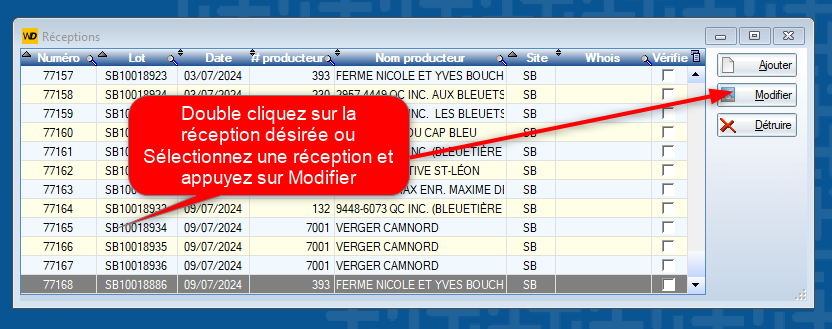
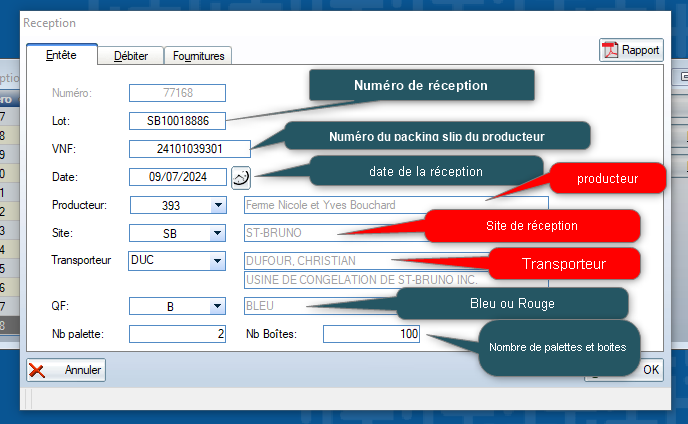
Valider les informations de la réception.

\* ***important \**** Porter une attention particulière au # de producteur afin de s'assurer que c'est le bon numéro.

[![image.png](https://bdc.wild-blueberries.com/uploads/images/gallery/2024-07/scaled-1680-/JuBLcsKNpq7YpTxt-image.png)](https://bdc.wild-blueberries.com/uploads/images/gallery/2024-07/JuBLcsKNpq7YpTxt-image.png)
Valider le numéro de produit et s'assurer qu'il correspond au packing slip du producteur

Valider la quantité

[![image.png](https://bdc.wild-blueberries.com/uploads/images/gallery/2024-07/scaled-1680-/0ehyDmXYE2mQrLHV-image.png)](https://bdc.wild-blueberries.com/uploads/images/gallery/2024-07/0ehyDmXYE2mQrLHV-image.png)
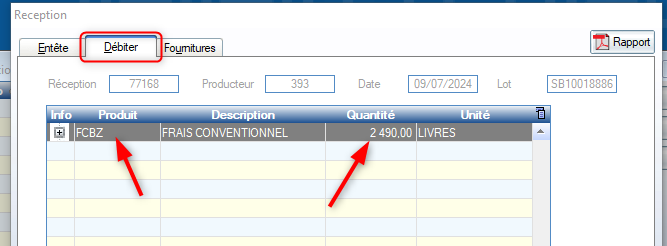
Valider les fournitures

[![image.png](https://bdc.wild-blueberries.com/uploads/images/gallery/2024-07/scaled-1680-/TMymoTA4WrempSWz-image.png)](https://bdc.wild-blueberries.com/uploads/images/gallery/2024-07/TMymoTA4WrempSWz-image.png)
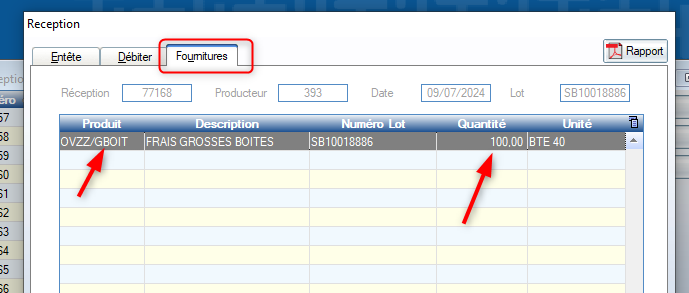
Quand on reçoit - Quantité positive (Boîtes pleines)

Quand on remet - Quantité négative ( Boîtes vides)

OVZZ/GBOIT = Boîte 40 lbs (Bleuetière)

OVZZ/PBOIT = Boîte 30 lbs (utilisée surtout Forêt)

OVZZ/NBOIT = pour blast