# Usinage - Compilation et suivi de lots

Guide explicatif

# Compilation des rapports d'usinage

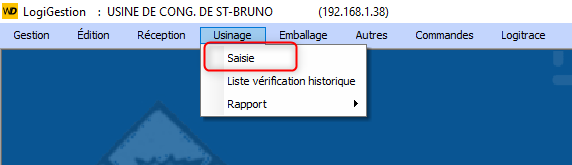
Aller dans le menu Usinage et choisir Saisie

[![image.png](https://bdc.wild-blueberries.com/uploads/images/gallery/2024-07/scaled-1680-/3GBfRJ91EOMvsmeF-image.png)](https://bdc.wild-blueberries.com/uploads/images/gallery/2024-07/3GBfRJ91EOMvsmeF-image.png)
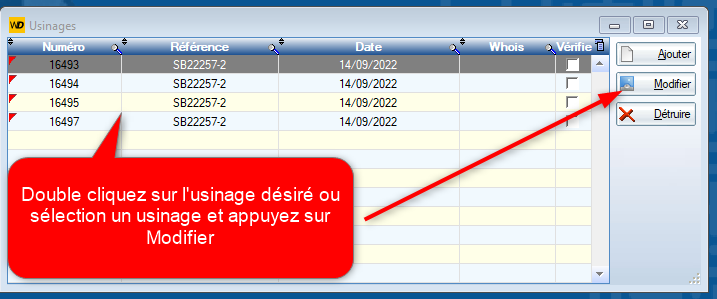
[![image.png](https://bdc.wild-blueberries.com/uploads/images/gallery/2024-07/scaled-1680-/QrKSC9aMGNIrRBLX-image.png)](https://bdc.wild-blueberries.com/uploads/images/gallery/2024-07/QrKSC9aMGNIrRBLX-image.png)
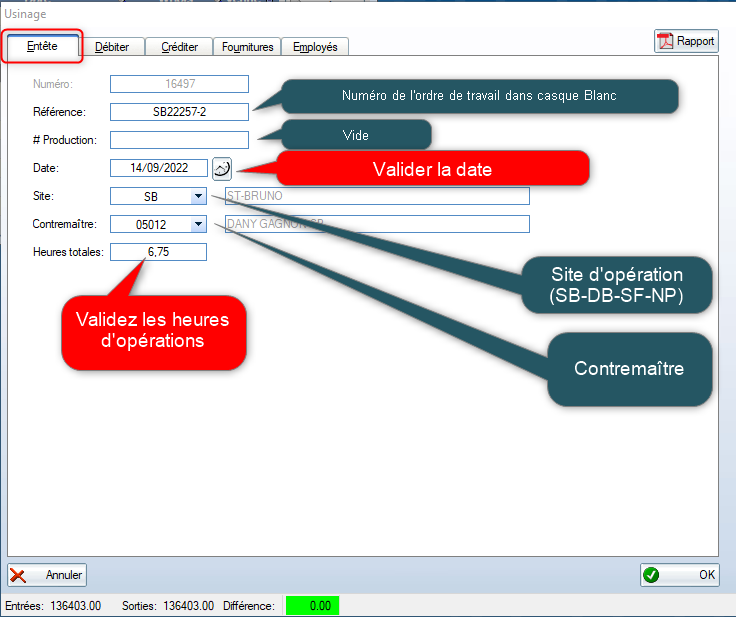
Valider les informations générales de l'usinage.

[![image.png](https://bdc.wild-blueberries.com/uploads/images/gallery/2024-07/scaled-1680-/oiQp7A6qxqBr3Blw-image.png)](https://bdc.wild-blueberries.com/uploads/images/gallery/2024-07/oiQp7A6qxqBr3Blw-image.png)
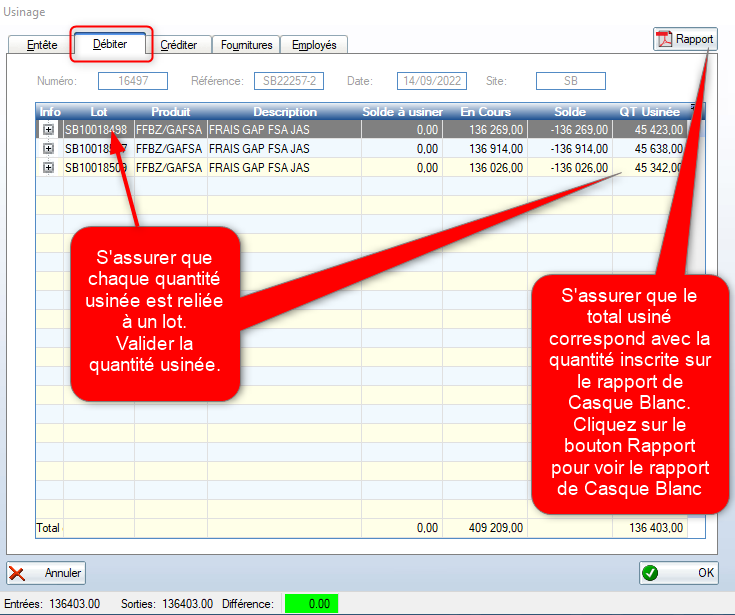
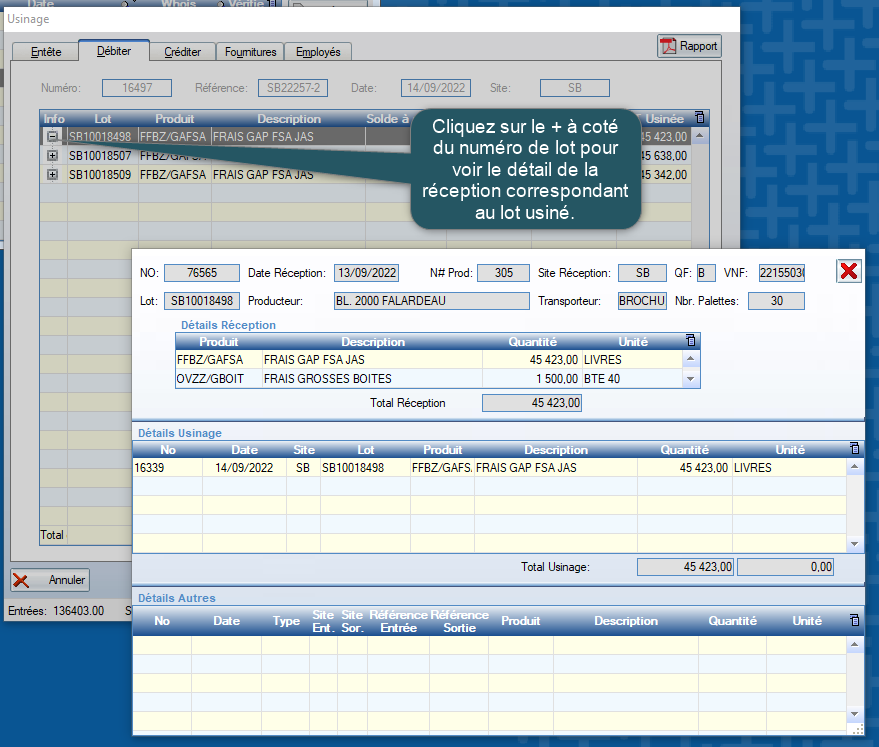
Validation des lots usinés.

[![image.png](https://bdc.wild-blueberries.com/uploads/images/gallery/2024-07/scaled-1680-/xeBPU7nHHUhIgX1m-image.png)](https://bdc.wild-blueberries.com/uploads/images/gallery/2024-07/xeBPU7nHHUhIgX1m-image.png)
[![image.png](https://bdc.wild-blueberries.com/uploads/images/gallery/2024-07/scaled-1680-/jTVnmiM6DKLwpQnm-image.png)](https://bdc.wild-blueberries.com/uploads/images/gallery/2024-07/jTVnmiM6DKLwpQnm-image.png)
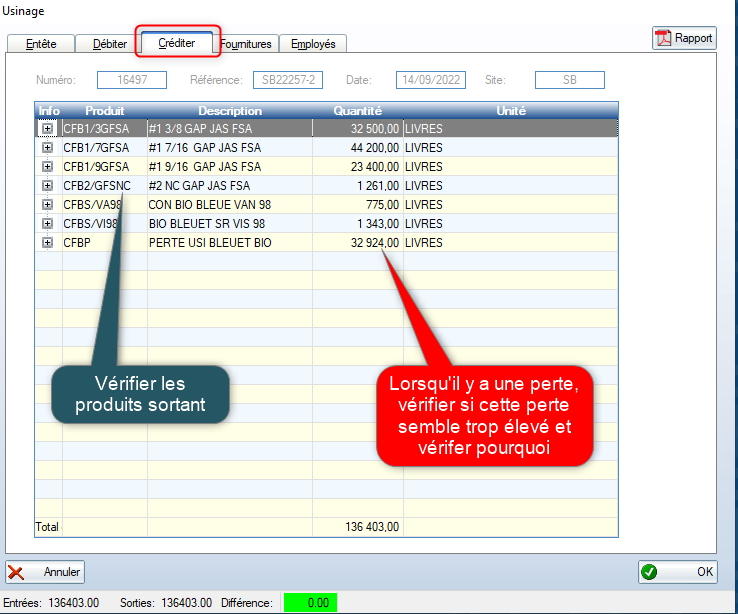
Vérification des produits sortants

[![image.png](https://bdc.wild-blueberries.com/uploads/images/gallery/2024-07/scaled-1680-/vxYn9y4BxLvjHasb-image.png)](https://bdc.wild-blueberries.com/uploads/images/gallery/2024-07/vxYn9y4BxLvjHasb-image.png)
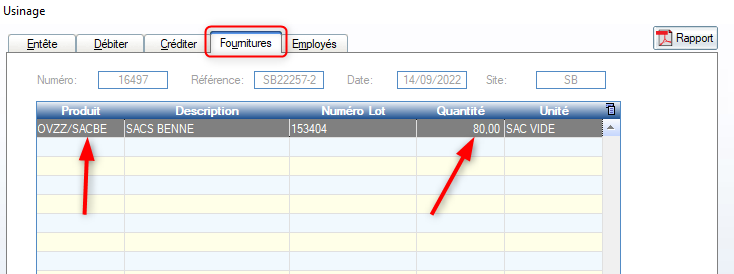
Vérifier les fournitures.

[![image.png](https://bdc.wild-blueberries.com/uploads/images/gallery/2024-07/scaled-1680-/5oVYmxrTBEyYbxfs-image.png)](https://bdc.wild-blueberries.com/uploads/images/gallery/2024-07/5oVYmxrTBEyYbxfs-image.png)
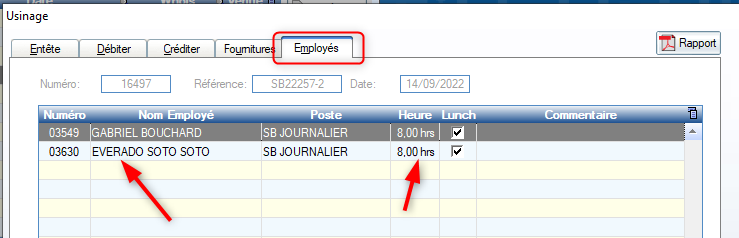
Vérifier le temps des employés.

[![image.png](https://bdc.wild-blueberries.com/uploads/images/gallery/2024-07/scaled-1680-/03rqPTVP5VdbEM3c-image.png)](https://bdc.wild-blueberries.com/uploads/images/gallery/2024-07/03rqPTVP5VdbEM3c-image.png)
# Contrôle des lots

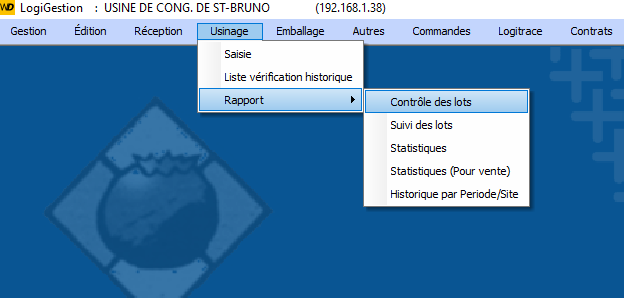
Choisissez Rapport/Contrôle des lots dans le menu Usinage

[![image.png](https://bdc.wild-blueberries.com/uploads/images/gallery/2024-07/scaled-1680-/oBV7hd9rYRtX2TFd-image.png)](https://bdc.wild-blueberries.com/uploads/images/gallery/2024-07/oBV7hd9rYRtX2TFd-image.png)
<span style="color:rgb(224,62,45);">***\* *Attention \*****</span>

<span style="color:rgb(224,62,45);">***Ce contrôle doit être fait quotidiennement.***</span>

[![image.png](https://bdc.wild-blueberries.com/uploads/images/gallery/2024-07/scaled-1680-/KtdwfAvOldVPs1h6-image.png)](https://bdc.wild-blueberries.com/uploads/images/gallery/2024-07/KtdwfAvOldVPs1h6-image.png)

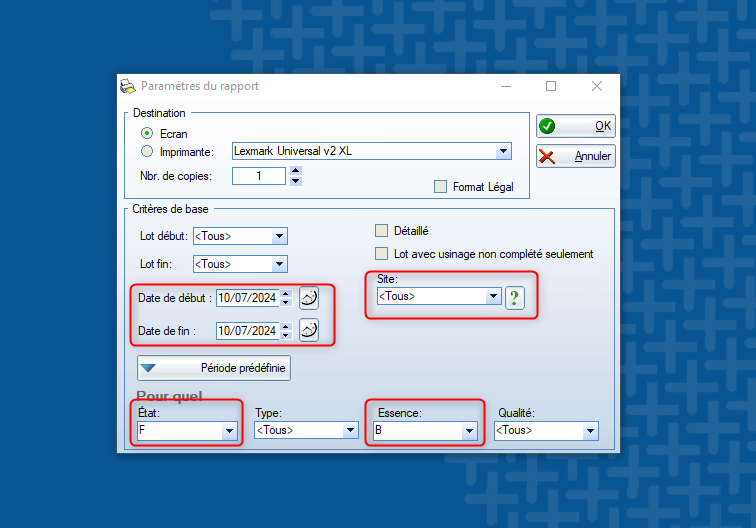
<span style="color:rgb(0,0,0);background-color:rgb(255,255,255);">Date de début = date de début de la saison</span>

<span style="color:rgb(0,0,0);background-color:rgb(255,255,255);">Date de fin = date du jour</span>

<span style="color:rgb(0,0,0);background-color:rgb(255,255,255);">État = Frais (F)</span>

<span style="color:rgb(0,0,0);background-color:rgb(255,255,255);">Essence = Bleuet (B)</span>

<span style="color:rgb(0,0,0);background-color:rgb(255,255,255);">Choisir le site (SB/SF/DB/NP)</span>

<span style="color:rgb(0,0,0);background-color:rgb(255,255,255);">Sortir le rapport en appuyant sur OK.</span>

##### <span style="color:rgb(224,62,45);">**<span style="background-color:rgb(255,255,255);">Vérifier les lots non usinés. Ils doivent être usinés dans les 48 heures.</span>**</span>